
Courses and syllabus
Standard flying and ground courses built from DGCA-recommended hours and lesson structure. Start a custom course from one as a template, then change the lessons, sorties, durations and grading your FTO does differently.
FTOM
One system for the whole flying training organisation — student admissions and records, courses, batches, instructors, fleet, auto-rostering and every flight logged and graded. It puts the spreadsheets, the WhatsApp groups and the paper files in one place, so you can see where every student stands and what every aircraft is doing today.
Student Management
Students maintain their own details, so records stay current without your office chasing them. Progress is computed from what they have actually flown rather than tallied by hand at month end.
Invite a student by email and they onboard themselves — profile, licence, medical, exams and documents. You review each document and approve the admission from one queue.
Cohorts start a course together with their instructors attached. Move or transfer a student between batches, and track classroom modules separately from flying.
A progress bar and an on-time or delayed flag against every student, hours flown versus plan, and the pending-endorsement backlog per batch — so you catch the student drifting in week three, not at the end of the course.
What It Covers
Standard flying and ground courses built from DGCA-recommended hours and lesson structure. Start a custom course from one as a template, then change the lessons, sorties, durations and grading your FTO does differently.
Qualifications, authorised courses and operation types, examiner authority and daily duty caps — held on the record once, and applied everywhere after.
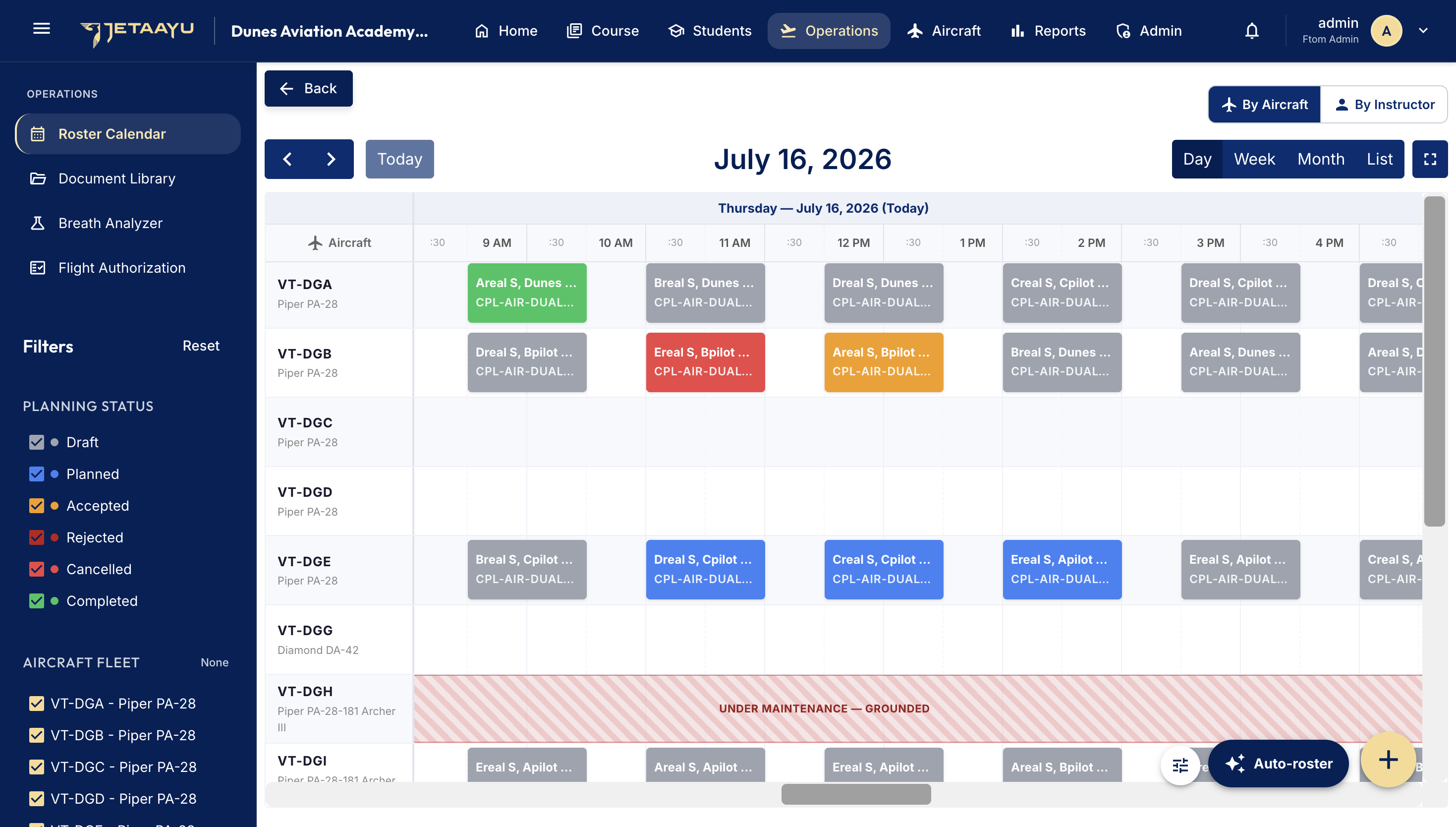
Capability approvals per tail, planning priority and maintenance windows. A grounded or AOG aircraft blocks itself on the calendar, so nobody schedules over it.
A per-aircraft day, week, month and list view. Add a sortie by hand, edit, publish, complete or cancel one with a reason, and filter down to a status or a single tail.
Run more than one training base from the same account, each with its own students, instructors and aircraft — and report across all of them or drill into one.
Your manuals and reference documents filed by category, uploaded by administrators and readable by everyone who needs them.
Auto-Rostering
Because the syllabus, qualifications, duty caps and fleet capabilities are already on record, FTOM can schedule for you. Give it a date range; it works out who flies what, with whom, in which aircraft and at what time.
Each student's next due lesson, an instructor authorised for that course and operation type, and an aircraft with the matching capability approval — Dual, Solo, XC, Night, IFR, ME — that is not grounded. Duty caps and utilisation limits are hard limits, and each slot is sized from its own lesson's duration.
No instructor authorised, capability not approved, medical expired, no free slot in the window — grouped by cause with the fix. You spend your morning fixing one bottleneck instead of hunting for it.
A run produces a draft. Nothing reaches a student or instructor until you publish it, and published sorties are never overwritten by a later run. Students running behind are moved up the order automatically; a Priority Boost is there for when you want to prioritise someone by hand.
Live ADS-B Tracking
Tracking is scoped to the tails on your own fleet register, so the map carries your training aircraft and nothing else.
Each airborne tail reports altitude, ground speed, heading, vertical speed and squawk against its callsign, registration and type — with In Flight, Taxiing, Approaching and On Ground called out as it happens.
Live counts of what is airborne, on the ground and in maintenance, plus each tail's current location and hours flown today — read next to the roster that put it there.
Positions plot across the circuits and training areas your students actually fly, so the duty officer can see a sortie is airborne without calling the tower.
Three Apps
The control centre you run the FTO from: admissions, courses, batches, fleet, rostering, reports and administration, in a desktop browser.
Roster with accept and reject, leave and rest windows that block scheduling, course progress, grade history, and the auth, journey and pilot logbooks — each auto-filled from the completed sortie.
Assigned sorties to accept, reject and mark complete, grading by whatever method the lesson uses, lesson endorsements, and the authorisations that unlock a student's next stage.
Oversight and Compliance
What a DGCA inspector asks for is captured as part of the day, not reconstructed the week before an audit.
The CAR Appendix II breath-test register against each sortie, and the flight-authorization log students submit and instructors endorse — Draft, Submitted, Endorsed or Rejected.
Crew flight and duty-time monitoring with a watch-list and violation flags, plus medical-certificate expiry and endorsement backlog surfaced before either becomes a grounding.
Enrollment, progress, operations, fleet, instructor and compliance dashboards — and a roster-health report that trends rostered against unrostered and points at the cause. Filter by date, base, batch or training type, and save any of them to PDF.
How It Runs
Your staff accounts, instructors and their qualifications, the fleet and its capabilities, and your courses.
Invite students, approve their documents and medicals, and place them in a flying batch with a start date.
Auto-roster the week, read the exceptions, fix the bottleneck it names, and publish.
Sorties are accepted, flown, logged and graded in the apps, tracked live on the map, and credited back into the next run.